TechReviewz is a participant in the Amazon Services LLC Associates Program and other affiliate advertising programs designed to provide a means for us to earn fees by linking to Amazon.com and affiliated sites. Affiliate links may be used on this page and in Techreviewz articles, but they do not impact on the price that you pay and they do help me to get this information to you for free. Read my privacy policy for more information regarding affiliates.
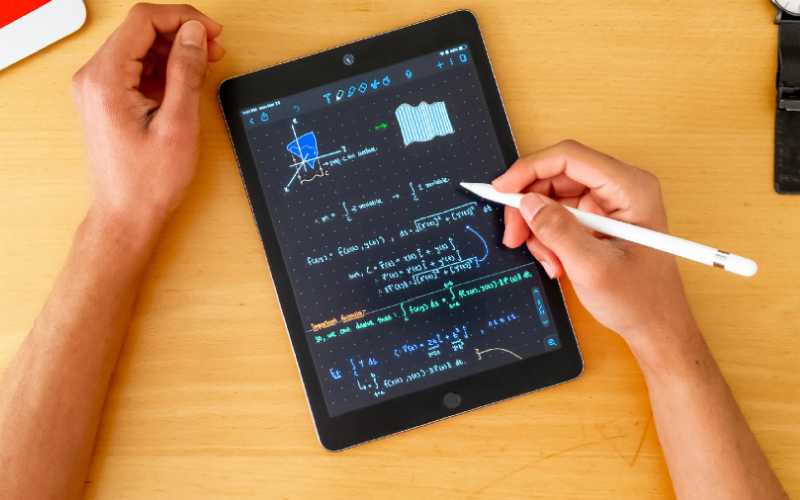
For creativity, it has traditionally been the custom to use paper notepads, however, tablets offer a great deal more flexibility and with advances in handwriting recognition progressing at a rapid pace it may now be the time to ditch the notepad. Today, we’re on a quest to find the Best Tablet for Note Taking.
Stylus equipped notepads are available using a range of operating systems including Windows, IOS, Android, and some proprietary and specialist formats. These will all allow you to jot down notes and ideas, annotate documents and sketch diagrams. You may choose an option that has the same operating system and is compatible with your current eco-system or choose something different altogether.
To help you make an informed decision we have rounded up a selection of devices, at various price points. Serious notetakers and artistic types may need to look for devices with high screen resolutions, fast processors, good storage capacities, and innovative active stylus features, whereas for occasional use lower cost options are available. Other considerations include display size, battery life, compatibility with various apps you wish to use, and if you want the device to double as a laptop you may want to consider convertible or hybrid options.
So, what is the Best Tablet for Note Taking?
Table of Contents
Best Low-Cost Option
Amazon Fire Series
The Amazon Fire series of tablets are among the cheapest around, have excellent battery life, and are fully featured with both basic stylus support and built in cameras and microphones. These have expandable storage via micro-SD card and are rugged, portable, and have a large range of available accessories. The Fire HD8 (middle of the range) is a good option, however larger screened alternatives are available albeit with a slightly bulky design.

- 8" HD display, twice the storage (32 or 64 GB of internal storage and up to 1 TB with microSD card) + 2 GB RAM.
- Up to 12 hours of reading, browsing the web, watching video and listening to music.
- Now with USB C for easier charging. Fully charges in under 5 hours (with included cable + adaptor).
- 30% faster thanks to the new 2.0 GHz quad-core processor.
- Enjoy your favourite apps like BBC iPlayer, Netflix, Disney+, Now, Facebook, Instagram, TikTok, YouTube and more through the Amazon Appstore (Google Play Store not supported). Subscription fees may apply.

Unfortunately, these devices are loaded with an Amazon version of Android which has limitations with regards the range of available applications so they may not be compatible with all the software you wish to use.
These do not come with a stylus so generic options will need to be used and results will be nowhere near as good as with devices with dedicated styluses. Having said this, the price is a fraction of that of the other devices in this review so they may be good for occasional use and they also double up as good media consumption and casual gaming tablets.

- 10.1" 1080p full HD display and 64 GB of internal storage (add up to 512 GB with microSD).
- Now 30% faster thanks to the 2.0 GHz octa-core processor and 2 GB of RAM.
- Up to 12 hours of reading, browsing the web, watching videos and listening to music with USB-C port for easy charging.
- Enjoy your favourite apps like BBC iPlayer, Netflix, Disney+, Facebook, Instagram, TikTok, YouTube and more through the Amazon Appstore (Google Play Store not supported). Subscription fees may apply.
- Hands free with Alexa.
Best Android Option
Samsung Galaxy Tab S6 Lite 10.4”
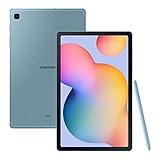
The Samsung Galaxy Tab S6 Lite 10.4” is available in a range of colours and variations including options with LTE for mobile network connectivity. These tablets are significantly cheaper than the fully featured Tab S6 but offer many of the same benefits such as an included active stylus.

- More freedom in your hands: write, sketch, annotate. The new S Pen puts a world of possibilities at your fingertips
- Your family entertainment hub, to go: a huge 10.4” display, superb AKG sound, Netflix* and YouTube at a touch – that's your family entertainment sorted *Netflix subscription and app download required
- Designed for everywhere: light and compact, it’s the perfect take-anywhere tablet for life on the move
- Keep your home life in sync: connects effortlessly with your home to become your new family hub
- What's in the box: Samsung Galaxy Tab S6 Lite LTE 64GB Oxford Grey, S Pen, USB Type C cable and Ejection pin
Performance is excellent due to the inclusion of an octa-core processor, 4GB of RAM, a decent graphics chip and 64GB of onboard storage with micro-SD expandability if required and excellent battery life.
The highlight however is the screen – this panel has a resolution of 2000 x 1000, is very bright and vivid, and performs well in most lighting conditions. The screen is exceptionally responsive to the stylus making this device ideal for both general notetaking and for digital artists. This tablet includes the latest version of Android and is compatible with most recent android applications.
Best IOS Option
Apple iPad Pro
Available in both 11” and 12.9” versions, the iPad pro is by far the best option for digital artists, albeit at a much higher cost than most other devices, especially considering the fact that it does not come with a stylus and requires the purchase of an Apple Pencil at considerable cost to complete the note-taking set up. Although other stylus options are available, none compete with Apples own device in terms of functionality, accuracy and battery life.
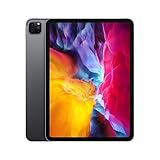
- 11-inch edge-to-edge Liquid Retina display with ProMotion, True Tone, and P3 wide colour
- A12Z Bionic chip with Neural Engine
- 12MP Wide camera, 10MP Ultra Wide camera, and LiDAR Scanner
- 7MP TrueDepth front camera
- Face ID for secure authentication and Apple Pay
The iPad Pro comes in various configurations and colours, including LTE options for mobile coverage, and seamlessly fit in to the Apple ecosystem if you have other Apple devices.
Performance is exceptional – these tablets are fitted with the fastest processors, 4GB of RAM, and superb screens with resolutions up to 2732 x 2048 for the 12.9” version. Keyboards and other accessories are available so these devices can double up as almost fully featured laptops if required. One limitation is that these devices do not have expandable storage, so you need to make sure you get a suitable capacity model from the start.

- 12.9-inch edge-to-edge Liquid Retina display with ProMotion, True Tone, and P3 wide colour
- A12Z Bionic chip with Neural Engine
- 12MP Wide camera, 10MP Ultra Wide camera, and LiDAR Scanner
- 7MP TrueDepth front camera
- Face ID for secure authentication and Apple Pay
Best Windows Option
Microsoft Surface Go 2 10.5”
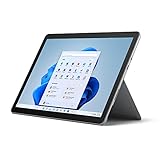
A lower cost option in the Microsoft range, the Microsoft Surface Go 10.5” has a higher than HD 1920 x 1280 touch screen which is bright, vivid and responsive. This tablet runs on Windows 10 making it compatible with the widest range of software of any of the products covered in this review.
The specifications can best be described as basic with only 64GB of onboard storage, a basic integrated graphics chip and only 4GB of RAM, however, for general notetaking these are ideal as they are extremely portable, are compatible with some good styluses, and can be expanded with optional keyboards and other accessories to make them double as fully featured laptops. Battery life is excellent.
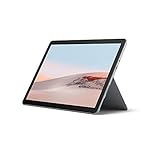
- FREE Upgrade to Windows 11 - The Windows 11 upgrade will be delivered to qualifying devices late 2021 into 2022. Timing varies by device. Certain features require additional hardware - more information found on Microsoft Windows store.
- Use as a 2-in-1 laptop when you combine with a Type Cover* and enjoy tablet portability with laptop performance and versatility, with adjustable Kickstand (*sold separately)
- Starting at just 544g (not including Type Cover), with new 10.5 Inch touchscreen
- Built-in WiFi, plus USB-C port, headphone jack, HD front- and rear-facing cameras keep you connected
- Activities for everyone, add a Type Cover* for an enhanced laptop experience — jot down ideas, write papers, help with homework, and manage email, with a Hi-res, detachable touchscreen that’s perfect for browsing, playing, binge watching and use as a tablet (*sold separately)
Best Alternative Option
reMarkable
The reMarkable is a device that resembles an e-reader with a black and white e-ink type display and is supplied with a stylus. It allows you to take handwritten notes, read and review documents, edit PDF’s, and convert handwritten notes into text in 33 languages. It is compatible with most operating systems so your notes can be transferred easily to other devices. The screen is eye-friendly and very responsive. One of the highlights of this product is the exceptional battery life – it can last up to 2 weeks without recharging. Another benefit is the size – it is just 4.7mm thick and weighs less than any of the other product reviewed. The stylus attaches to the device magnetically to prevent it being mislaid and has a digital eraser and does not require separate charging.
I hope that you found this blog on the Best Tablet for Note Taking helpful. You might also be interested in reading some of our tablet reviews:
